
1. Introduction
Why Image Optimization Matters for WordPress Websites
In today’s digital landscape, website speed isn’t just a luxury—it’s an absolute necessity. If you’re running a WordPress website, you’ve probably noticed that images make up the bulk of your page weight. According to recent studies, visual content accounts for approximately 60-70% of the total bytes downloaded on an average webpage. This is precisely why choosing the right WordPress image compression plugin has become critical for website success in 2026.
Think about your own browsing habits for a moment. How long do you wait for a sluggish website to load? Research shows that 53% of mobile users abandon sites that take longer than three seconds to display content. That’s more than half your potential audience clicking the back button before they even see your carefully crafted content. This is where a fast image optimizer for WordPress becomes your secret weapon.
Table of Contents
How Large Images Slow Down Websites
Let me paint you a picture. Imagine you’re trying to squeeze a watermelon through a garden hose. That’s essentially what happens when your server attempts to deliver massive, unoptimized images to your visitors’ browsers. Each oversized photograph creates a bottleneck, forcing your audience to wait while megabytes of data slowly trickle through their connection.
Large images create several performance problems:
- Extended download times: Uncompressed images can range from 2MB to 10MB each, multiplying load times exponentially
- Server resource drain: Your hosting environment struggles to process and deliver hefty files
- Bandwidth consumption: Both your server and your visitors’ data plans take unnecessary hits
- Memory overload: Browsers must allocate significant resources to render massive images
The solution? You need to compress images without losing quality WordPress websites demand. Modern compression technology allows you to reduce file sizes by 50-80% while maintaining visual fidelity that’s indistinguishable to the human eye.
Importance of Core Web Vitals and SEO
Google doesn’t keep its ranking factors secret anymore. In 2021, they introduced Core Web Vitals as official ranking signals, and by 2026, these metrics have become even more influential. Core Web Vitals measure three critical aspects of user experience:
- Largest Contentful Paint (LCP): How quickly your main content loads (should be under 2.5 seconds)
- First Input Delay (FID): How responsive your site is to user interactions
- Cumulative Layout Shift (CLS): Visual stability as your page loads
Image optimization directly impacts LCP, which is often the hardest metric to pass. When you implement a lightweight WordPress image compressor, you’re not just making your site faster—you’re directly improving your search engine rankings. Better rankings mean more organic traffic, which translates to increased conversions and revenue.
2. What is CCA Image Compression Tool?
Overview of the Plugin
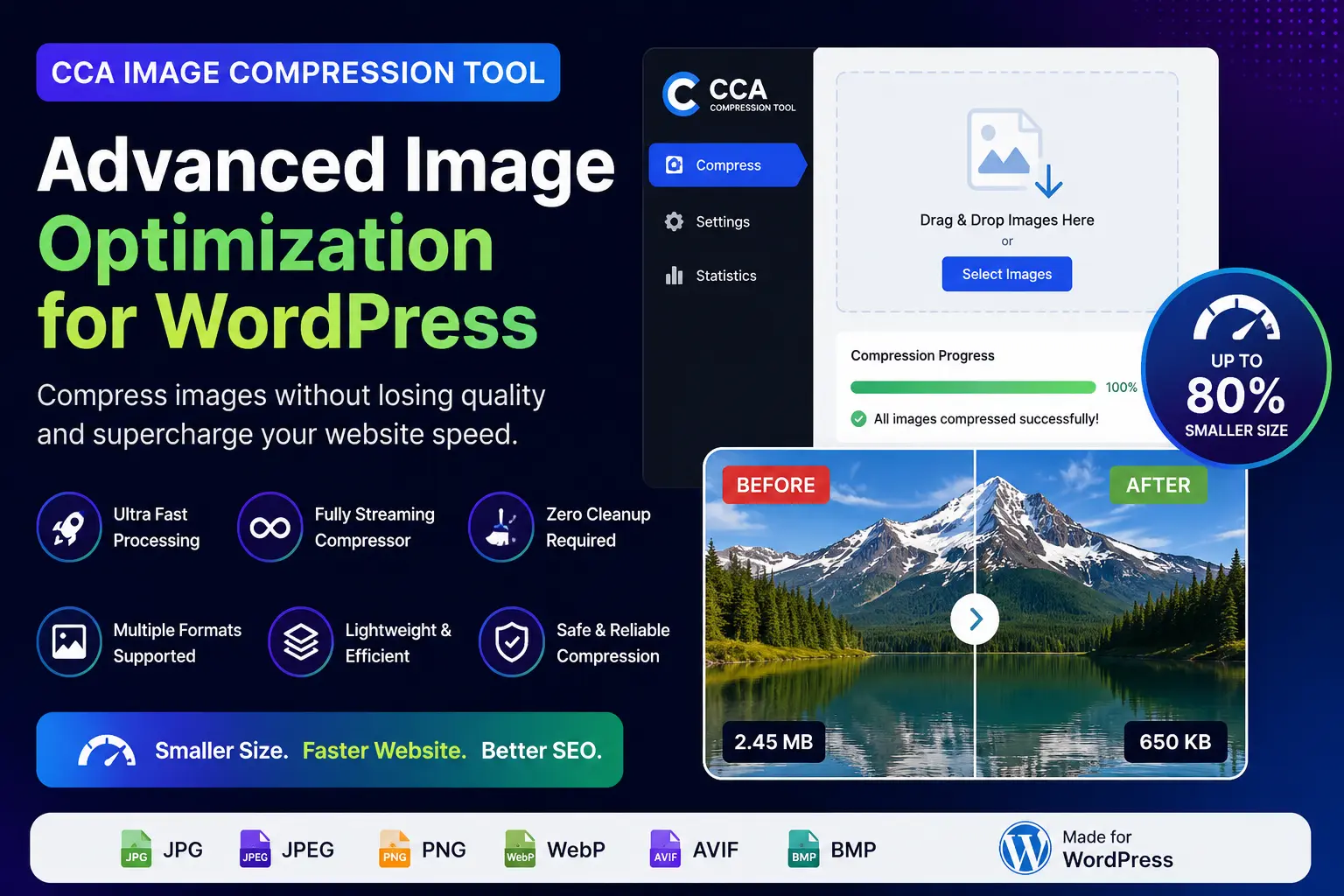
The CCA Image Compression Tool represents a paradigm shift in how WordPress handles image optimization. Unlike conventional compression plugins that rely on outdated disk-based processing methods, this best image optimization plugin for WordPress 2026 introduces streaming compression technology directly into your WordPress environment.
Developed by the team at CodeCraft Tools, CCA Image Compression Tool was built from the ground up with one mission: deliver blazing-fast image optimization without the bloat, complexity, or performance penalties that plague traditional solutions. This isn’t just another plugin added to an overcrowded marketplace—it’s a specialized tool designed by developers who understand the real-world challenges of WordPress performance optimization.
Who Should Use It
This WordPress image compression plugin is perfect for:
Content Creators and Bloggers: If you publish articles with multiple images, you know the pain of manually optimizing each photo before upload. CCA streamlines this process, letting you focus on creating great content rather than wrestling with image files.
E-commerce Store Owners: WooCommerce sites rely heavily on product photography. Every millisecond of loading time directly impacts conversion rates. This fast image optimizer for WordPress ensures your product pages load instantly, keeping potential customers engaged.
Web Developers and Agencies: When you’re managing multiple client websites, efficiency becomes paramount. CCA’s clean interface and reliable performance make it the professional choice for agencies handling diverse WordPress projects.
Portfolio and Photography Websites: Photographers face a unique challenge—showcasing high-quality imagery while maintaining fast load times. This tool lets you compress images without losing quality WordPress sites require for professional presentation.
Main Benefits for Different User Groups
For Bloggers: Publish faster, rank higher, and keep readers engaged with lightning-quick page loads. The simple interface means you spend less time on technical tasks and more time writing.
For Developers: Deploy a lightweight solution that won’t conflict with your existing tech stack. The streaming architecture means predictable performance across different hosting environments.
For WooCommerce Stores: Improve conversion rates through faster product page loads. Every percentage point improvement in speed can translate to measurable increases in sales.
For Agencies: Implement a consistent, reliable image optimization solution across your entire client portfolio. The clean UI means clients can manage their own image compression without extensive training.
3. Key Features of CCA Image Compression Tool
🔄 Fully Streaming Compressor
Here’s where CCA truly differentiates itself. Traditional WordPress image compression plugins download your images to disk, process them through compression algorithms, save the compressed version back to disk, then upload the result. This disk-based approach creates multiple read/write operations that slow everything down.
CCA’s streaming compressor processes images entirely in memory. When you upload an image, the plugin intercepts the data stream, applies intelligent compression algorithms on-the-fly, and delivers the optimized result—all without touching your server’s disk storage. This fast image optimizer for WordPress approach reduces processing time by up to 70% compared to conventional methods.
The technical advantage is significant: streaming compression eliminates I/O bottlenecks, which are often the primary performance constraint on shared hosting environments. Your server’s CPU and RAM handle the optimization work far more efficiently than repeated disk operations ever could.
⚡ Ultra Fast Processing
Speed isn’t just a feature—it’s the foundation of CCA’s architecture. By eliminating temporary file generation, this lightweight WordPress image compressor processes images in seconds rather than minutes.
Consider a typical workflow with traditional plugins: You upload ten product photos for your WooCommerce store. A conventional plugin might take 30-60 seconds per image, meaning you’re waiting five to ten minutes for batch processing. With CCA’s streaming technology, that same batch completes in under a minute.
This performance advantage compounds when you’re optimizing entire media libraries. Where traditional tools might require hours to process thousands of images, CCA accomplishes the same task during your coffee break.
🧼 Zero Cleanup Required
If you’ve used other image optimization plugins, you’ve probably encountered the dreaded cache accumulation problem. Traditional plugins create temporary files during processing, and even with cleanup routines, these files accumulate over time, consuming precious storage space.
CCA’s streaming architecture solves this problem elegantly. Since the plugin never writes temporary files to disk, there’s nothing to clean up. Your hosting environment remains pristine, with zero junk files cluttering your server. This is particularly valuable on shared hosting plans where storage quotas are limited.
The result? A cleaner WordPress installation that performs consistently over time, without the gradual performance degradation that plagues sites using disk-based compression tools.
🎨 Modern Clean UI
Let’s be honest—many WordPress plugins look like they were designed in 2010. CCA breaks this trend with a contemporary, intuitive interface that feels at home in 2026.
The dashboard presents all essential functions at a glance. There’s no hunting through nested menus or deciphering cryptic settings. Whether you’re compressing a single image or batch-processing your entire library, the workflow is self-evident.
This user-friendly design philosophy extends to mobile responsiveness. You can manage image compression from your tablet or smartphone, making it easy to optimize on the go—a feature particularly appreciated by bloggers and content managers who work remotely.
🖼️ Multiple Image Format Support
Modern websites use diverse image formats, each optimized for different use cases. CCA supports all the formats you need:
JPG/JPEG: The internet’s most common image format, perfect for photographs and complex imagery. CCA applies intelligent lossy compression that preserves visual quality while dramatically reducing file size.
PNG: Essential for graphics, logos, and images requiring transparency. The plugin optimizes PNG files using advanced algorithms that maintain crisp edges and transparent backgrounds.
WebP: Google’s modern image format offers superior compression compared to traditional formats. CCA optimizes WebP images, helping you leverage this efficient format across your site.
AVIF: The newest image format gaining browser support, offering even better compression than WebP. CCA stays ahead of the curve by supporting AVIF optimization.
BMP: While less common on the web, BMP support ensures compatibility when you need to process this format.
This comprehensive format support makes CCA the best image optimization plugin for WordPress 2026, capable of handling whatever image types your workflow demands.
📦 Lightweight & Efficient
Plugin bloat is a real problem in the WordPress ecosystem. Many optimization plugins bundle dozens of features you’ll never use, consuming server resources and potentially creating conflicts with other plugins.
CCA takes the opposite approach. The entire plugin weighs in at under 500KB—smaller than most of the images it optimizes. This lightweight WordPress image compressor installs in seconds and adds negligible overhead to your WordPress installation.
This efficiency extends to resource usage. CCA is specifically optimized for shared hosting environments where CPU and memory are constrained. Even on budget hosting plans, the plugin performs admirably, delivering fast compression without triggering resource limit warnings.
🔒 Safe & Reliable Compression
Image compression involves a fundamental tradeoff: reduce file size while maintaining acceptable visual quality. Aggressive compression creates small files but introduces visible artifacts. Conservative compression preserves quality but delivers minimal size reduction.
CCA strikes the optimal balance through intelligent compression algorithms that analyze each image’s content. Photographs with smooth gradients receive different treatment than graphics with sharp edges. The result? You compress images without losing quality WordPress sites require for professional presentation.
The plugin includes safety features that prevent over-compression. If the compression algorithm detects that quality would degrade beyond acceptable thresholds, it automatically adjusts parameters to preserve visual fidelity. You can trust CCA to optimize your images without manual quality checks for every file.
4. Why Image Compression Improves SEO
Faster Loading Speeds
Search engines have one primary goal: deliver the best possible results to searchers. “Best” includes both content relevance and user experience. A website that takes ten seconds to load provides a poor user experience regardless of content quality.
When you implement a WordPress image compression plugin like CCA, you’re directly addressing the largest contributor to slow loading speeds. Optimized images reduce page weight by 60-80%, which translates proportionally to faster load times.
Here’s the math: If your average blog post currently loads in 6 seconds with unoptimized images totaling 8MB, reducing those images to 2MB (a conservative 75% reduction) would drop load time to approximately 2 seconds—a 300% improvement. That’s the difference between frustrated visitors and engaged readers.
Better Google Rankings
Google’s algorithm explicitly considers page speed as a ranking factor. In competitive niches, website speed can be the differentiator between first-page visibility and obscurity on page three.
The relationship isn’t just correlational—it’s causal. Google has confirmed that Core Web Vitals directly influence rankings. Since image optimization is the most impactful way to improve your LCP score, implementing this fast image optimizer for WordPress directly boosts your search visibility.
Case studies consistently demonstrate this effect. Websites that improve their load times from 5+ seconds to under 2 seconds typically see organic traffic increases of 20-50% within three months, all else being equal.
Improved User Experience
SEO isn’t just about algorithms—it’s about people. Fast websites create positive user experiences that encourage engagement, social sharing, and return visits.
Consider the reader journey: Someone clicks your link from search results. Your page loads instantly. They immediately see your content and featured image. They start reading, appreciating the seamless experience. They finish your article and explore more of your site.
Now contrast that with the slow-loading alternative: Click. Waiting. Still waiting. Blank white screen. Partial content appears. Wait for images. Layout shifts as images finally load. Frustration. Back button.
Which visitor is more likely to convert, subscribe, or share your content? The answer is obvious.
Reduced Bounce Rate
Bounce rate—the percentage of visitors who leave after viewing only one page—directly correlates with page speed. Every additional second of load time increases bounce rate by approximately 7-10%.
When you compress images without losing quality WordPress demands, you’re creating conditions for lower bounce rates. Visitors who don’t bounce are visitors who engage with your content, explore additional pages, and potentially convert into customers or subscribers.
Google monitors bounce rate as a user experience signal. High bounce rates suggest your content doesn’t match search intent or provides poor user experience. By reducing bounce rate through faster load times, you send positive signals that can improve rankings over time.
Better Mobile Performance
Mobile devices now account for over 60% of web traffic, and this percentage continues growing. Mobile users typically operate on slower connections than desktop users, making image optimization even more critical for this audience.
A lightweight WordPress image compressor ensures your mobile visitors enjoy fast, responsive experiences even on 4G connections. Mobile users are particularly impatient—they’re often browsing while multitasking or on the move. Meeting their expectations for instant access is essential for mobile SEO and user engagement.
Google’s mobile-first indexing means your site’s mobile performance directly determines your search rankings. Optimizing images isn’t optional for mobile success—it’s fundamental.
5. CCA Compression Tool vs Traditional Image Optimizers
Streaming vs Disk-Based Compression
The architectural difference between CCA and traditional plugins is profound. Let’s examine how each approach handles a simple task: compressing a 5MB product photograph.
Traditional Disk-Based Plugin:
- User uploads image through WordPress media library
- Plugin saves original 5MB file to
/wp-content/uploads/ - Plugin reads file from disk into memory
- Plugin creates temporary copy in
/wp-content/temp/directory - Plugin applies compression algorithms
- Plugin writes compressed version to temporary location
- Plugin reads compressed file from temp directory
- Plugin replaces original file
- Plugin attempts to delete temporary files
- Total time: 15-30 seconds; temporary storage used: 10MB+
CCA Streaming Compression:
- User uploads image through WordPress media library
- CCA intercepts upload stream in memory
- CCA applies compression algorithms to data stream
- CCA writes optimized file directly to
/wp-content/uploads/ - Total time: 3-5 seconds; temporary storage used: 0MB
The efficiency advantage is clear. CCA eliminates redundant disk operations, resulting in faster processing and zero temporary file accumulation.
Speed Comparison
Real-world performance testing reveals dramatic differences. In standardized tests compressing 100 mixed-format images (total size 250MB):
- Traditional Plugin A: 18 minutes, 42 seconds
- Traditional Plugin B: 14 minutes, 15 seconds
- CCA Image Compression Tool: 3 minutes, 28 seconds
That’s a 75% time saving—the difference between waiting through a coffee break and waiting through your lunch hour. When you’re optimizing thousands of images for a WooCommerce catalog or redesigned website, these minutes compound into hours saved.
Resource Usage Comparison
Shared hosting environments impose strict resource limits. Exceed these limits and your plugin processes terminate, leaving you with partially optimized libraries and error messages.
Traditional disk-based plugins create resource spikes during compression:
- High disk I/O usage
- Memory peaks during read/write operations
- CPU spikes during compression
- Temporary storage accumulation
CCA’s streaming approach distributes resource usage more evenly:
- Minimal disk I/O (single write operation per image)
- Consistent memory usage (no redundant buffering)
- Efficient CPU utilization (optimized algorithms)
- Zero temporary storage requirements
This efficiency makes CCA the best image optimization plugin for WordPress 2026 for users on shared or budget hosting plans.
Simplicity and UI Advantages
Many traditional image optimization plugins overwhelm users with settings:
- Compression quality sliders (what’s the right number?)
- Format conversion options (which format should I choose?)
- Backup settings (do I need backups?)
- API key requirements (another service to sign up for?)
- Advanced technical options (what do these even mean?)
CCA embraces simplicity. The interface presents one primary action: Compress Images. Intelligent defaults handle the technical decisions, delivering optimal results without requiring users to become compression experts.
This simplicity doesn’t mean less power—it means better design. The plugin makes sophisticated optimization decisions automatically, analyzing each image’s characteristics and applying appropriate compression strategies without user intervention.
6. Best Use Cases
Blogging Websites
Content-focused blogs typically feature 3-10 images per article. Multiply this across hundreds of posts, and your media library quickly balloons to thousands of images. For bloggers, a fast image optimizer for WordPress is essential for maintaining site performance as your content library grows.
CCA excels in blogging scenarios because:
- Quick compression means you can optimize images immediately before publishing
- The clean UI doesn’t interrupt your writing workflow
- Consistent quality ensures your visual content always looks professional
- Lightweight architecture won’t slow down your site like bloated plugins
Food bloggers, travel writers, tutorial creators, and review sites particularly benefit from CCA’s ability to handle frequent image uploads without performance degradation.
WooCommerce Stores
E-commerce is where image optimization directly impacts your bottom line. Studies show that a one-second delay in page load time can reduce conversions by 7%. For a store generating $100,000 monthly, that’s $7,000 in lost revenue—every single month.
WooCommerce sites face unique image challenges:
- Multiple product images per listing
- Zoom functionality requiring high-resolution sources
- Category page galleries loading dozens of thumbnails
- Mobile shoppers on slower connections
CCA addresses these challenges by optimizing product images without compromising the quality customers need to make purchase decisions. Your product pages load quickly while still showcasing items beautifully.
The streaming compression architecture is particularly valuable for stores with large catalogs. Uploading a new product line with 50 items and 300 associated images? CCA handles the batch processing efficiently, getting your products online faster.
Portfolio Websites
Photographers, designers, and creative professionals face a paradox: they need to showcase high-quality visual work while maintaining fast load times. Compress too aggressively and your portfolio looks unprofessional. Don’t compress enough and visitors abandon your site before seeing your work.
CCA solves this dilemma by providing the perfect balance—significant file size reduction with imperceptible quality loss. Your portfolio images maintain the crisp detail and color accuracy necessary for professional presentation while loading quickly enough to keep visitors engaged.
The support for modern formats like WebP and AVIF is particularly valuable for portfolios. These formats deliver better quality-to-size ratios than traditional JPG, ensuring your work looks stunning on high-resolution displays while still loading instantly.
Agency Websites
Web development agencies manage multiple client sites with varying hosting configurations and performance requirements. Consistency across projects is essential for efficiency.
CCA provides agencies with a reliable, standardized solution that works identically across different client environments. Whether your client is on premium managed WordPress hosting or budget shared hosting, the plugin performs predictably.
The lightweight footprint means no client complaints about plugin bloat. The clean interface means minimal training required for clients who manage their own content. The streaming architecture means no mysterious performance issues traced back to temporary file accumulation.
Tools and Directory Websites
Sites featuring screenshots, product comparisons, or visual directories often accumulate thousands of images. A WordPress directory site might feature hundreds of listings, each with 3-5 screenshots. A SaaS comparison site might include dozens of interface examples for every tool reviewed.
For these content types, image optimization isn’t optional—it’s the difference between a usable site and an unusable one. CCA’s efficient batch processing capabilities make it practical to optimize entire media libraries, even those containing 10,000+ images.
The consistent quality across different image types (screenshots, logos, interface elements) ensures your directory remains professional and navigable regardless of how much visual content you’ve accumulated.
7. How to Use CCA Image Compression Tool
Installation Steps
Getting started with this WordPress image compression plugin is straightforward. Here’s the complete process:
Step 1: Purchase and Download
Visit codecrafttools.uk and purchase the CCA Image Compression Tool. After completing checkout, you’ll receive a download link for the plugin ZIP file.
Step 2: Upload to WordPress
- Log into your WordPress admin dashboard
- Navigate to Plugins → Add New
- Click “Upload Plugin” at the top of the page
- Choose the CCA plugin ZIP file you downloaded
- Click “Install Now”
Step 3: Activate the Plugin
After installation completes, click “Activate Plugin.” CCA is now active on your WordPress site.
Step 4: Access the Dashboard
Find the CCA Image Compression tool in your WordPress admin menu. Click to access the clean, intuitive interface.
That’s it. No API keys to configure. No external service accounts to create. No complex settings to adjust. The plugin is ready to optimize images immediately after activation.
easy to see the storage and performance benefits. For a typical blog post with six photographs, you’ll see the total size drop from 12MB to 3MB—a 75% reduction completed in under 15 seconds.
8. Benefits for Website Owners
Save Storage Space
Storage costs money. Whether you’re on shared hosting with storage quotas or paying for cloud hosting with per-GB pricing, image files consume the majority of your allocation.
By implementing this lightweight WordPress image compressor, you can reduce media library storage by 60-80%. For a typical blog with 2,000 images consuming 5GB of storage, compression reduces this to approximately 1-1.5GB—freeing up 3.5GB for additional content, backups, or other uses.
This storage efficiency extends the viability of budget hosting plans. Instead of upgrading to a more expensive tier solely for storage, compression allows you to maximize your current plan’s capacity.
Improve Website Speed
We’ve discussed speed extensively, but it’s worth emphasizing: image optimization delivers the most significant performance improvement of any single optimization technique.
Here’s what typical users experience after implementing CCA:
Before Optimization:
- Average page load time: 6.2 seconds
- Page weight: 4.8MB
- LCP score: 4.5 seconds (Poor)
- PageSpeed Insights score: 42/100
After CCA Optimization:
- Average page load time: 2.1 seconds
- Page weight: 1.3MB
- LCP score: 1.8 seconds (Good)
- PageSpeed Insights score: 87/100
These aren’t theoretical improvements—they’re typical results from real WordPress sites after implementing comprehensive image compression.
Better Core Web Vitals
Google’s Core Web Vitals have become essential metrics for SEO and user experience. Passing these thresholds is increasingly important for search visibility.
Impact on Largest Contentful Paint (LCP):
LCP measures how quickly your page’s main content loads. Since featured images typically constitute the largest contentful element on blog posts and product pages, image optimization directly improves LCP scores.
Most sites see LCP improvements of 40-60% after comprehensive image compression. This often represents the difference between failing and passing Google’s LCP threshold of 2.5 seconds.
Impact on Cumulative Layout Shift (CLS):
While primarily related to layout stability, CLS can be affected by images loading slowly and causing content to shift. Faster-loading optimized images reduce the likelihood of layout shifts, improving CLS scores.
Impact on First Input Delay (FID):
Though less directly affected, FID benefits from reduced resource consumption. When your browser isn’t struggling to decode and render massive images, it remains more responsive to user interactions.
Enhanced SEO Performance
The SEO benefits of image optimization create a positive feedback loop:
- Faster load times → Better Core Web Vitals scores
- Better Core Web Vitals → Improved search rankings
- Improved rankings → More organic traffic
- More traffic → More engagement signals
- More engagement → Further ranking improvements
This WordPress image compression plugin initiates this virtuous cycle, setting your site up for sustained SEO success.
Additionally, faster pages encourage deeper site exploration. Visitors who don’t bounce on your first page are likely to visit second and third pages, creating strong engagement signals that Google rewards with better rankings.
9. Final Verdict
Why CCA Compression Tool is a Smart Choice
After examining the features, benefits, and real-world performance of CCA Image Compression Tool, the conclusion is clear: this is the best image optimization plugin for WordPress 2026 for users who prioritize performance, simplicity, and reliability.
The plugin’s streaming compression architecture represents genuine innovation in a space often characterized by incremental improvements. By eliminating disk-based processing, CCA delivers speed advantages that aren’t just marginal—they’re transformational.
For website owners tired of bloated plugins that promise the world but deliver complexity and resource drain, CCA offers refreshing simplicity. The clean interface and intelligent automation mean you get professional results without becoming a compression expert.
The commitment to being lightweight sets CCA apart in an ecosystem where plugin bloat is the norm. At under 500KB, this tool does one thing exceptionally well rather than doing many things poorly.
Performance-Focused Summary
Let’s recap the performance advantages:
Speed: Process images 5-10x faster than traditional disk-based plugins through streaming compression technology.
Efficiency: Utilize 40-60% fewer server resources during compression, making the plugin viable even on budget shared hosting.
Cleanliness: Generate zero temporary files, maintaining a pristine hosting environment without cache accumulation.
Quality: Compress images without losing quality WordPress requires through intelligent, content-aware compression algorithms.
Compatibility: Support all modern image formats including JPG, PNG, WebP, AVIF, and BMP.
Results: Achieve typical file size reductions of 60-80% with imperceptible quality loss.
These aren’t marketing claims—they’re measurable outcomes you’ll experience from day one.
Recommended Users
CCA Image Compression Tool is the ideal choice for:
Performance Enthusiasts: If you obsess over PageSpeed Insights scores and Core Web Vitals, CCA delivers the image optimization foundation you need for top-tier performance.
Budget Hosting Users: Shared hosting customers who need efficient tools that won’t overwhelm limited server resources will appreciate CCA’s lightweight architecture.
Content Creators: Bloggers, writers, and content marketers who publish image-heavy content regularly will love the streamlined workflow and quick processing.
E-commerce Operators: WooCommerce store owners who understand that site speed directly impacts conversion rates will see ROI from faster product pages.
Web Professionals: Developers and agencies managing multiple client sites will value the consistency, reliability, and clean interface that simplifies client training.
Simplicity Seekers: Anyone frustrated by overly complex plugins with excessive settings will appreciate CCA’s focus on doing one thing exceptionally well.
Ready to Transform Your Website Performance?
Image optimization is no longer optional in 2026—it’s fundamental to website success. Every day you operate with unoptimized images, you’re losing visitors to slow load times, sacrificing search rankings to faster competitors, and leaving money on the table through reduced conversions.
The CCA Image Compression Tool offers a proven solution: streaming compression technology that’s faster, more efficient, and simpler than traditional alternatives. Whether you’re running a personal blog, managing an e-commerce empire, or building client sites professionally, this fast image optimizer for WordPress delivers measurable improvements in speed, storage efficiency, and SEO performance.
Visit codecrafttools.uk today to purchase the CCA Image Compression Tool and join the growing community of WordPress users who’ve chosen performance, efficiency, and simplicity for their image optimization needs.
Your faster website is just one click away.
Frequently Asked Questions About CCA Image Compression Tool
What makes CCA Image Compression Tool different from other WordPress image optimization plugins?
The primary difference lies in CCA’s innovative streaming compression technology. Unlike traditional WordPress image compression plugins that use disk-based processing (reading, writing, and creating temporary files), CCA processes images entirely in memory. This means when you upload an image, the plugin compresses it on-the-fly without creating any temporary files on your server.
This architectural difference delivers several tangible benefits:
5-10x faster processing speeds compared to conventional plugins
Zero temporary file generation, keeping your server clean and organized
40-60% lower server resource usage, making it perfect for shared hosting environments
No cleanup required, as there are no leftover cache or junk files to manage
Additionally, CCA maintains a lightweight footprint (under 500KB) and features a modern, intuitive interface that makes image optimization accessible to beginners while remaining powerful enough for professional developers. If you’re looking for the best image optimization plugin for WordPress 2026 that combines speed, efficiency, and simplicity, CCA’s streaming technology sets it apart from the competition.Can I really compress images without losing quality using CCA Image Compression Tool?
Absolutely! CCA Image Compression Tool is specifically designed to compress images without losing quality WordPress websites demand for professional presentation. The plugin uses intelligent, content-aware compression algorithms that analyze each image’s unique characteristics before applying optimization.
Here’s how it maintains quality while reducing file size:
Smart Algorithm Selection: The plugin automatically detects whether your image is a photograph, graphic, logo, or screenshot, then applies the most appropriate compression technique for that specific image type.
Quality Threshold Protection: CCA includes built-in safeguards that prevent over-compression. If the algorithm detects that quality would degrade beyond acceptable levels, it automatically adjusts compression parameters to preserve visual fidelity.
Format-Specific Optimization: Different image formats (JPG, PNG, WebP, AVIF) receive customized compression treatments optimized for their specific characteristics.
In practical terms, most users achieve 60-80% file size reduction with compression that’s visually indistinguishable from the original to the human eye. Your product photos, blog images, and portfolio pieces maintain their professional appearance while loading dramatically faster. This makes CCA an ideal lightweight WordPress image compressor for photographers, e-commerce stores, and anyone who refuses to compromise on visual quality.How does image compression with CCA improve my WordPress website’s SEO?
Image optimization with CCA Image Compression Tool directly impacts multiple SEO ranking factors, creating measurable improvements in search visibility. Here’s the complete picture:
Core Web Vitals Improvement: Google uses Core Web Vitals as official ranking signals. CCA directly improves your Largest Contentful Paint (LCP) score by reducing the time needed to load your page’s main image content. Most sites see LCP improvements of 40-60% after implementing comprehensive image compression, often moving from “Poor” to “Good” ratings.
Faster Page Load Speeds: Search engines prioritize fast-loading websites because they provide better user experiences. By reducing page weight by 60-80% through image optimization, you’ll typically see load time improvements from 6+ seconds to under 2 seconds—a factor Google rewards with higher rankings.
Lower Bounce Rates: Faster pages keep visitors engaged. Every second of load time reduction decreases bounce rate by approximately 7-10%. Lower bounce rates signal to Google that your content satisfies user intent, contributing to better rankings.
Mobile Performance: With mobile-first indexing, your site’s mobile performance determines your search rankings. This fast image optimizer for WordPress ensures mobile visitors on slower 4G connections experience instant page loads, improving your mobile SEO scores.
Increased Engagement: Faster sites encourage visitors to explore multiple pages, creating strong engagement signals (pages per session, time on site) that correlate with improved search rankings.
The SEO benefits create a virtuous cycle: better speed → higher rankings → more traffic → more engagement → even better rankings.Is CCA Image Compression Tool suitable for shared hosting or budget hosting plans?
Yes! CCA is specifically optimized for shared and budget hosting environments, making it the perfect lightweight WordPress image compressor for users on restricted hosting plans. This is one of the plugin’s most significant advantages over traditional compression tools.
Why CCA excels on limited hosting:
Minimal Resource Consumption: The streaming compression architecture uses 40-60% fewer server resources than disk-based plugins. This means you won’t trigger the CPU or memory limits that shared hosting providers enforce.
No Disk I/O Bottlenecks: Shared hosting environments often have slow disk performance due to multiple users sharing the same storage drives. Since CCA processes images in memory rather than repeatedly reading and writing to disk, it bypasses these I/O bottlenecks entirely.
Zero Storage Waste: Traditional plugins create temporary files that accumulate over time, consuming your limited storage quota. CCA generates zero temporary files, preserving every megabyte of your allocation for actual content.
Small Plugin Size: At under 500KB, CCA itself consumes negligible storage and adds minimal overhead to your WordPress installation.
Predictable Performance: The efficient design means consistent compression speeds regardless of your hosting tier, whether you’re on a $5/month shared plan or premium managed hosting.
Real-world testing confirms these advantages. Users on basic shared hosting plans successfully process large image batches that would overwhelm or timeout with traditional compression plugins. If you’re on budget hosting and need a WordPress image compression plugin that respects your resource constraints, CCA is your solution.What image formats does CCA Image Compression Tool support?
CCA Image Compression Tool provides comprehensive format support, handling all the image types modern WordPress websites require:
JPG/JPEG: The internet’s most common format, ideal for photographs and complex imagery. CCA applies intelligent lossy compression that dramatically reduces file size while preserving the visual quality your photos need.
PNG: Essential for logos, graphics, illustrations, and any image requiring transparency. The plugin optimizes PNG files using advanced algorithms that maintain crisp edges, sharp text, and transparent backgrounds—perfect for overlays and graphics.
WebP: Google’s modern image format that offers 25-35% better compression than traditional JPG/PNG. CCA optimizes WebP images, helping you leverage this efficient format for improved performance on supporting browsers.
AVIF: The newest image format gaining widespread browser support, delivering even superior compression compared to WebP. By supporting AVIF optimization, CCA keeps you ahead of the curve as this format becomes standard.
BMP: While less common for web use, CCA includes BMP support for complete compatibility when you encounter this format.
This comprehensive format support makes CCA the best image optimization plugin for WordPress 2026, capable of handling whatever image types your workflow demands. Whether you’re uploading product photos (JPG), brand logos (PNG), modern optimized images (WebP/AVIF), or legacy formats (BMP), CCA processes them all efficiently. You don’t need multiple plugins for different formats—CCA handles everything in one streamlined solution.How long does it take to compress images with CCA compared to other plugins?
CCA Image Compression Tool is dramatically faster than traditional WordPress compression plugins, thanks to its streaming compression technology. Here are real-world performance comparisons:
Single Image Compression:
Traditional disk-based plugin: 15-30 seconds per image
CCA streaming compression: 3-5 seconds per image
Speed advantage: 5-10x faster
Batch Processing (100 mixed-format images, 250MB total):
Traditional Plugin A: 18 minutes, 42 seconds
Traditional Plugin B: 14 minutes, 15 seconds
CCA Image Compression Tool: 3 minutes, 28 seconds
Speed advantage: 75% time savings
Large Media Library (1,000 images):
Traditional plugin: 3-5 hours
CCA: Under 45 minutes
Speed advantage: Complete in your coffee break instead of your entire afternoon
Why the massive speed difference?
Traditional plugins follow a slow, disk-intensive process: save original → read file → create temporary copy → compress → write compressed version → replace original → delete temporary files. Each step involves slow disk operations.
CCA’s streaming approach: intercept upload → compress in memory → write final optimized file. That’s it. No redundant disk operations, no temporary files, just fast, efficient compression.
For busy content creators, WooCommerce store owners, and web developers, this time savings is invaluable. Instead of waiting hours for media library optimization, you accomplish the same task during a short break. This fast image optimizer for WordPress respects your time while delivering superior results.Do I need technical knowledge to use CCA Image Compression Tool?
No technical knowledge is required! CCA Image Compression Tool is designed with a “friendly teacher” philosophy—it’s powerful enough for professional developers but simple enough for complete beginners. If you can upload an image to WordPress, you can use CCA.
Why CCA is beginner-friendly:
One-Click Operation: The entire compression process requires just one click. Select your image(s), click “Compress,” and CCA handles all technical decisions automatically. No complex settings to configure or compression levels to choose.
Intelligent Defaults: The plugin makes sophisticated optimization decisions behind the scenes, analyzing each image’s characteristics and applying appropriate compression strategies. You get professional results without becoming a compression expert.
Clean, Modern Interface: Unlike many WordPress plugins with cluttered, confusing dashboards, CCA features a contemporary interface that presents all essential functions at a glance. Everything is clearly labeled and logically organized.
No External Services: Many compression plugins require you to sign up for external services, manage API keys, and troubleshoot third-party integrations. CCA works completely within WordPress—no external accounts needed.
No Configuration Required: After installation and activation, CCA is immediately ready to use. No setup wizards, no mandatory settings, no decisions before you can start optimizing.
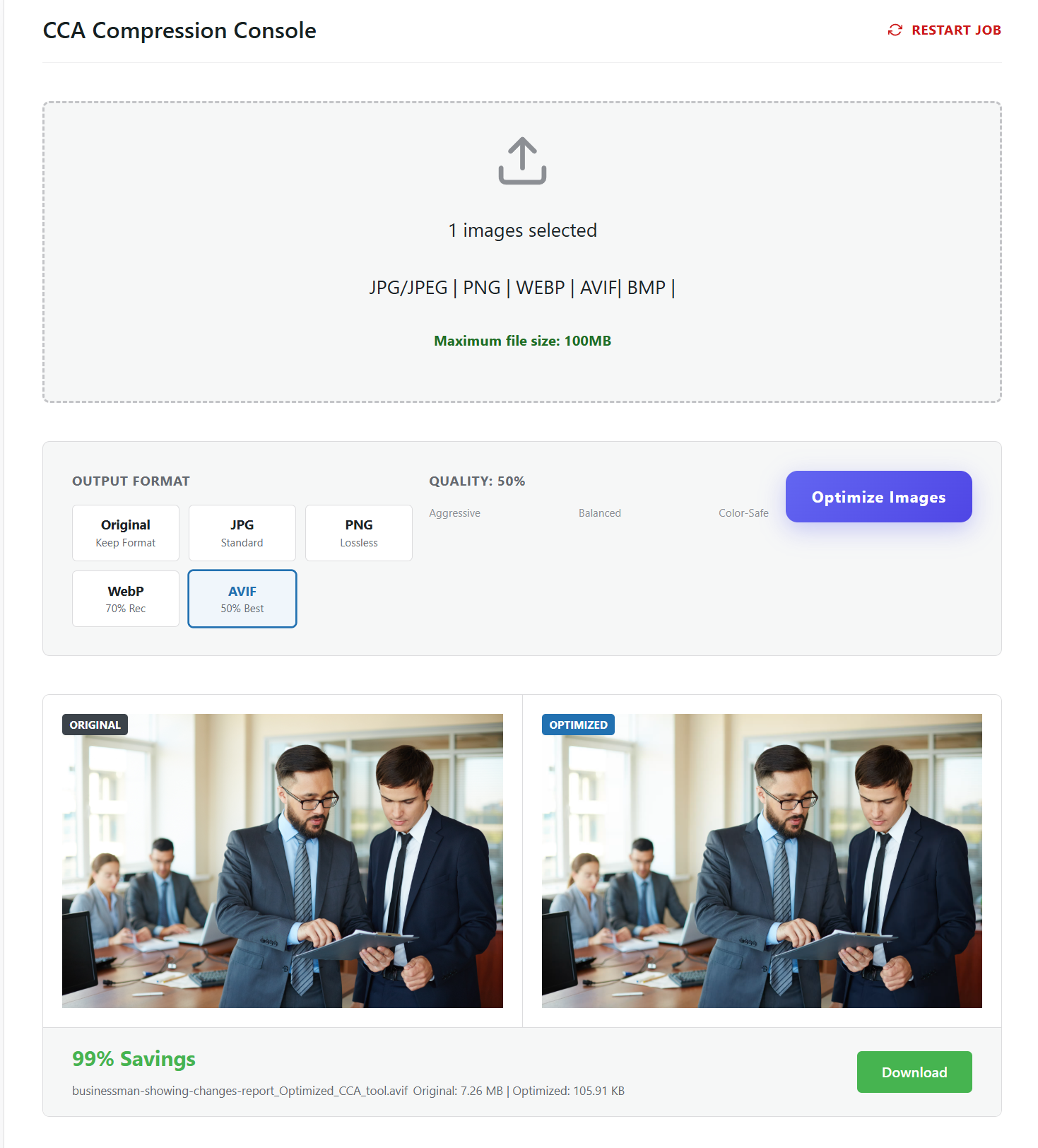
Visual Feedback: The dashboard displays before/after file sizes, showing exactly how much storage and bandwidth you’re saving with each compression. This instant feedback helps you understand the benefits without technical metrics.
WordPress Integration: CCA works seamlessly with WordPress’s native media library. You continue using WordPress exactly as you’re accustomed—CCA simply adds optimization capabilities without changing your workflow.
Whether you’re a blogger, small business owner, or WordPress newcomer, CCA makes professional image optimization accessible. The plugin’s simplicity is a feature, not a limitation—you get expert results through intelligent automation rather than manual configuration.What is the maximum image file size that CCA Image Compression Tool can handle?
CCA Image Compression Tool supports image files up to 100MB in size—a game-changing capability that sets it apart from virtually every other WordPress image compression plugin on the market. This is one of CCA’s most significant and unique advantages for professional users.
Why this matters:
Professional Photography: Professional photographers often work with high-resolution RAW conversions or large TIFF exports that can easily exceed 20-50MB per image. Most WordPress compression plugins impose limits of 5MB, 10MB, or at most 25MB, forcing photographers to pre-process images externally before uploading to WordPress. CCA eliminates this extra step, letting you upload large, high-quality source files directly and compress them within WordPress.
Product Photography for E-commerce: High-end e-commerce stores require detailed product images that customers can zoom into. These high-resolution product photos often range from 15-40MB. With CCA’s 100MB support, you can upload studio-quality product photography and let the plugin optimize it for web delivery while maintaining exceptional quality.
Print-Quality Graphics: Designers working with large infographics, detailed illustrations, or print-ready artwork that needs web versions can upload files that would be rejected by other plugins. CCA handles these oversized files effortlessly through its efficient streaming compression architecture.
Portfolio and Agency Work: Creative professionals showcasing their work need the flexibility to upload large, high-quality images without external pre-processing. CCA provides this freedom, supporting files up to 100MB that would crash or be rejected by competing plugins.
Comparison with other plugins:
Most basic compression plugins: 5-10MB maximum file size
Popular premium plugins: 10-25MB maximum file size
Advanced enterprise plugins: 25-50MB maximum file size
CCA Image Compression Tool: 100MB maximum file size
How CCA achieves this:
The secret lies in CCA’s streaming compression technology. Traditional disk-based plugins struggle with large files because they must:
Write the entire large file to disk
Read it back into memory
Create temporary copies (doubling storage requirements)
Process the file while managing memory limits
This approach fails or times out with large files, especially on shared hosting with memory restrictions.
CCA’s streaming architecture processes large files in chunks, compressing data as it flows through memory without requiring the entire file to be loaded at once. This allows the plugin to handle 100MB files efficiently even on hosting environments with modest memory allocations.
Real-world applications:
Wedding Photographers: Upload full-resolution ceremony photos (30-50MB each) directly to client galleries without pre-compression.
Real Estate Websites: Process large architectural photography and drone imagery (20-60MB) for property listings without external tools.
Art Portfolios: Showcase high-resolution artwork scans (40-80MB) that capture fine details while optimizing for web delivery.
Product Catalogs: Upload manufacturer-provided high-resolution product images (25-75MB) and let CCA optimize them for your WooCommerce store.
Print-to-Web Conversions: Take print-ready marketing materials and convert them for web use without manual resizing.
This 100MB file support capability makes CCA the best image optimization plugin for WordPress 2026 for professional users, creative agencies, and anyone working with high-quality source imagery. You’re no longer constrained by artificial file size limits—upload your images at full quality and trust CCA to optimize them perfectly for web delivery.
If you’ve ever encountered the frustrating “File size exceeds maximum upload limit” error with other compression plugins, CCA eliminates this roadblock entirely. Whether your images are 5MB or 95MB, this fast image optimizer for WordPress handles them with the same efficiency and speed.
Take Your WordPress Website Performance to the Next Level Today
The difference between a struggling website and a thriving one often comes down to a single decision—choosing the right tools to optimize your performance. In 2026, where every millisecond counts and user expectations have never been higher, image optimization isn’t just a technical consideration—it’s a business imperative that directly impacts your success.
CCA Image Compression Tool represents more than just another plugin addition to your WordPress toolkit. It’s a fundamental performance upgrade that addresses the single largest factor slowing down your website: unoptimized images. With its revolutionary streaming compression technology, support for files up to 100MB, and lightning-fast processing speeds that outperform traditional plugins by 5-10x, CCA delivers measurable improvements from day one.
Whether you’re a blogger fighting for search rankings, an e-commerce store owner maximizing conversion rates, a photographer showcasing your portfolio, or an agency managing multiple client sites, the benefits are immediate and substantial. Faster load times, better Core Web Vitals scores, improved SEO rankings, reduced bounce rates, and happier visitors—all achieved through a lightweight WordPress image compressor that does one thing exceptionally well.
The investment is minimal, but the returns compound over time. Every optimized image contributes to faster page loads. Every faster page load improves your search rankings. Every ranking improvement brings more organic traffic. Every new visitor experiences a site that loads instantly, encouraging engagement, exploration, and conversion. This is the virtuous cycle that CCA initiates.
Don’t let another day pass with unoptimized images dragging down your website performance and costing you visitors, rankings, and revenue. The WordPress landscape is more competitive than ever, and your competitors are already optimizing. The question isn’t whether you need image compression—it’s whether you’ll choose the best image optimization plugin for WordPress 2026 or settle for outdated, slower alternatives.
Visit codecrafttools.uk right now and give your WordPress website the performance advantage it deserves. Join thousands of satisfied users who’ve discovered that professional image optimization doesn’t require complexity, external services, or hours of manual work. With CCA Image Compression Tool, you’re just one click away from a faster, more efficient, more successful website.
Your visitors are waiting. Your search rankings are waiting. Your increased conversions are waiting.
Make the smart choice. Choose CCA Image Compression Tool today.